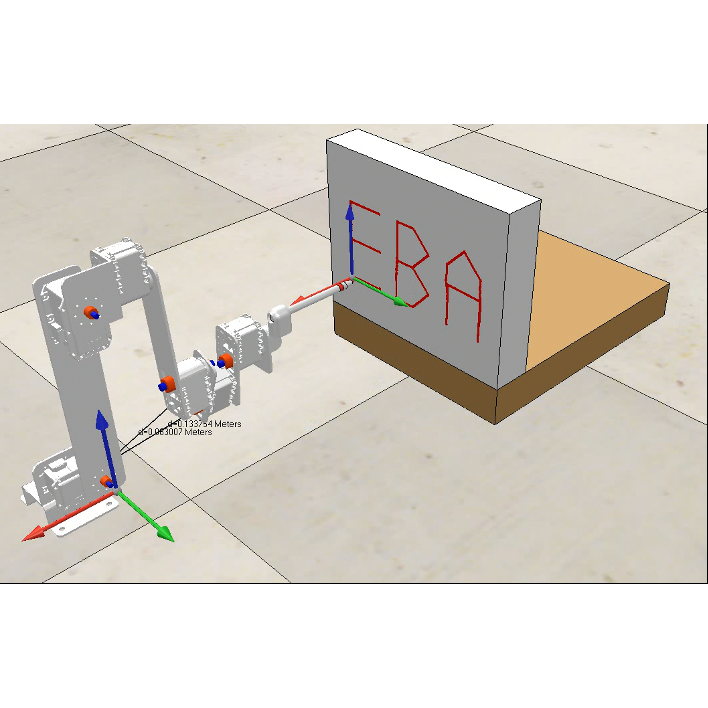
Writing Robot (Fall 2021)
Preface. This project was from a few years ago, so I’m digging through some blurry linear-algebra memories here. If I ever get more time, I’d like to come back and update this page. Originally, this was supposed to be a hands-on physical robot build with electronics and fabrication. Then COVID hit, so we ended up working with CoppeliaSim as a simulation environment. My part of the project was the programming and the calculations.
Tools
CoppeliaSim handled the 3D simulation, including joint motion, movement, collision checking, and sensors/environment, forces.
MATLAB handled the controller/brain: path planning, inverse kinematics, trajectory generation, and talking to CoppeliaSim.
Robotics basics
Forward kinematics (FK): given joint variables (angles), compute the end-effector pose.
Inverse kinematics (IK): given a desired pose, find the joint angles. There are two flavors:
- Analytical IK — closed-form, fast, exact, but only for certain robot geometries. Open-source analytical IK generators exist, like: ik-geo, IKBT.
- Numerical IK — iterative and slower but works for most robots. This project used this approach.
Robot setup
We defined the robot before any motion planning:
- Link lengths (L1, L2, ...)
- Screw axes (Slist)
- Home configuration (M matrix)
- Joint limits
- Writing plane transform (board frame)
We also defined content for the writing task:
- Letter sequence (word to draw)
- Letter spacing
- Local XY point sets for each character
Trajectory generation
How the robot figures out how to draw letters:
- Load letter shapes: each letter (A, B, C, O…) is stored as a small set of XY points.
- Transform into the writing board frame: use a T matrix to convert local letter points to global positions.
- Interpolate the trajectory: break the curves into very small steps for smooth drawing.
Inverse kinematics
For each tiny trajectory step:
- Use IKinSpace or IKinBody to solve joint angles.
- Use the previous solution as the next initial guess.
- If it fails, add small random noise to the guess and retry.
Final output
Robot video (YouTube)
MATLAB controller code
Full MATLAB script that plans the writing path and streams joint targets to CoppeliaSim. Expand below to view or copy.